It's late. Monday's proposal still has no opening line. You ask ChatGPT. It hands back one any junior consultant could type up in an hour, for any client.
Send that, and your client reads a proposal written for someone else. So you rewrite it. Again.
Why does ChatGPT give generic answers?
It has never met this client.
It has never met you either.
It doesn't know what you dislike or what you'd pick in a given situation. So it takes the safest guess and calls it a draft.
The safest guess is the average of everything it has read, and the average sounds like nobody.
ChatGPT knows what usually works.
It doesn't know what you'd pick. And that, my friend, is the problem we need to fix.
The seven fixes below handle both. To make ChatGPT less generic, teach it your choices (not just your voice).
So ask for options, from obvious to completely bonkers. Make it name the safe pick so you know what that looks like. Then pick yourself, and write one line on why you made that choice.
Do that a few times and you've got what I call a "Taste Log."
Keep it in your ChatGPT custom instructions. Every chat then starts with a reference point for how you choose.
Why Does ChatGPT Give Generic Answers?
ChatGPT predicts what usually works.
Without a reader or an example, it plays it safe. Or as one explainer puts it, it "reaches for the safest answer."
I gave Claude my newsletter's subject lines to pick the winners. Two tests were ties. Of the other 10, it got 8 right. 80%, not bad? But not good either.
That was Claude, guessing what subject lines my readers would choose. But getting 20% wrong can be the difference between keeping and losing a potential client.
Keep in mind, I gave Claude access to my Beehiiv data, so it wasn't answering 'blind'. Your clients are even more of a blank to it.
The whole test is how to teach AI your taste. Fixes 1 and 2 tell it about them. Then fixes 3 to 7 change what it picks.
1. Name One Reader and One Situation
Do this: Name one reader and one situation. Not "small business owners". A person, on a day.
The example below is a newsletter intro. The same move applies to anything you write.
Before: "Write a newsletter intro about pricing."
After: "Write a newsletter intro for HR consultants who just lost a client over price, reading on their phone between calls."
Try it on Monday's proposal or that LinkedIn Ad you've been stuck with all week. See what a difference it makes.
Name the one kind of client you want reading it. Then add the problem they had this week.
Like this;
"Ops directors at firms that just lost a big client" is a reader.
Read the first line ChatGPT gives you. Would that ops director keep reading? It should mention something only that reader would recognize.
To test it, swap your reader for "anyone."
If the post still fits, it's too broad. Add one more detail about the reader and ask again.
2. Show It One Piece You're Proud Of
Do this: Paste one thing you wrote that worked. Then say what to keep from it: the length, the opening move, how blunt it is.
Say you're writing a chase email to a client who's gone quiet. Your best sample email is the last one you sent that got a reply.
"Warm but direct" means something different to everyone. So it won't help ChatGPT until you show it enough good examples of what you actually mean.
When I say give it your best content (an email, a blog post, a LinkedIn post), I mean one thing. It got the result you wanted.
Perfect writing doesn't make it the best sample. It's the one that got you the result you wanted. Use that one.
I probably shouldn't need to say this, but just in case: match the examples to the job. A LinkedIn post won't teach ChatGPT how your emails open. Context matters.
I've covered building your whole voice profile in another post, including how many writing samples to give ChatGPT.
For now, collect 3 to 5 good examples that feel like you.
Then read the new draft next to your original. Is it about the same length? Does it open the same way?
Now look at the angle it took.
If it's the same safe one as before, keep going. Fixes 3 to 7 deal with that.
3. Ask for Options from Obvious to Rare
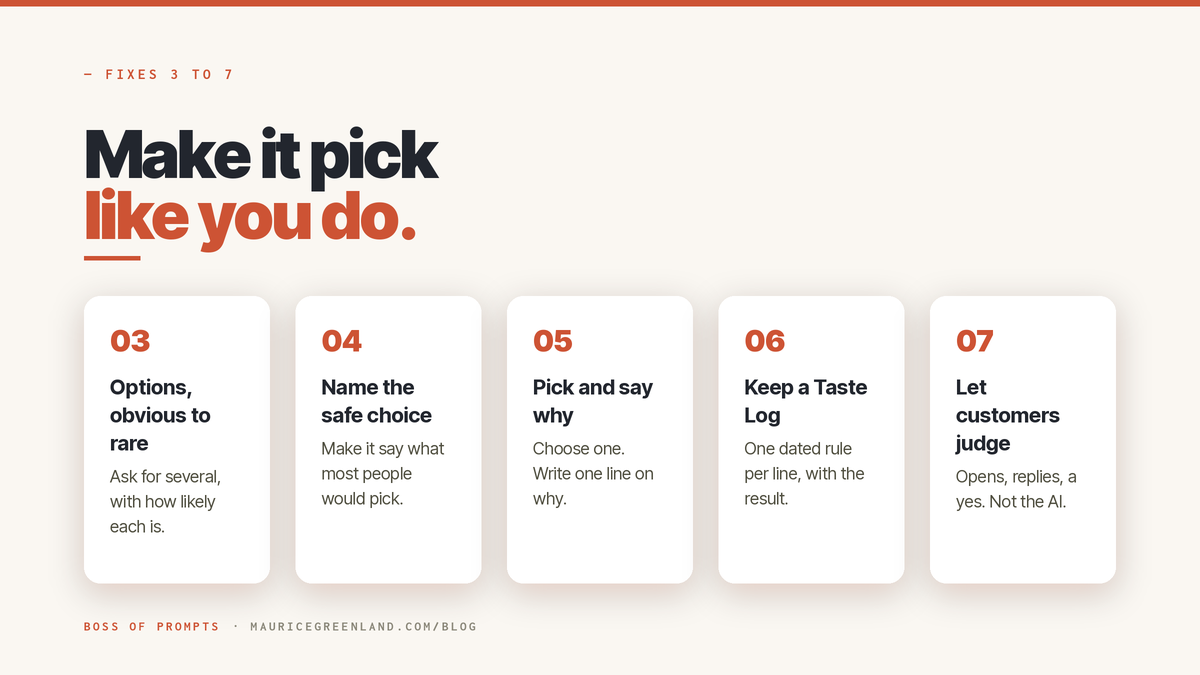
Do this: Ask for several options, ordered from the most obvious to the most unusual, and ask how likely another AI would be to give each one.
Here's the "how likely" trick in simple terms.
When you ask ChatGPT for one answer, it hands you the safe, boring one.
But if you ask for a few answers at once, along with how likely each one is, it opens up and gives you much more variety.
How much more? Thankfully, some clever folks tested this. They wrote it up in a paper called Verbalized Sampling.
When they asked for several answers and their odds, they got 1.6 to 2.1 times more variety in creative writing than a plain ask (Zhang et al., arXiv 2510.01171).
Think of it like asking a kid "pick a game"; you get "tag" every time. Ask "give me five games and tell me which ones you'd actually play"; now you get the fun, weird ones too.
Make ChatGPT Write Better Opening Lines
Now go one step further.
Ask for six openings, from the most obvious to the most unusual. Ask it to rate how likely another AI would be to write each one.
The top of the list is the opening every rival consultant sends. The bottom is the one nobody else would try.
Don't pick yet.
Read the top one first. If it could open any proposal, good. Now you know what average sounds like.
Then read from the bottom up, and mark every opening you'd be happy to send.
Check the bottom one against the top. If it's the same idea with the words shuffled, ask again. This time, ask for openings that make different promises.
Keep all six in the chat. You'll need them in fix 4.
4. Ask It to Name the Safe Choice
Do this: Before you pick, make it say which option most people would choose. This is the line from step 1 of my tested prompt:
"Tell me which option most people in my shoes would pick by default, and why, in one line. That is the safe choice. Say if my pick is the same one."
Paste it in the same chat, under your six openings.
You get the safe option, named, with one line on why.
Look at the openings you marked in fix 3.
Is your favorite the safe one? Then ask if you'd pick it again tomorrow.
Read its one-line reason too. If the reason is "clients expect it," that's habit talking. Your client never said it.
Sometimes the safe opening is the right one. At least now it's a choice.
5. Pick Yourself and Say Why
Do this: Stop asking "which one is better?" Choose one. Then write one line on why, in your own words.
"It feels right" won't help you next month.
Write a reason someone else could use. For Monday's proposal, that might be: "Opens on her finance team's worry about price."
That line is your rule, something ChatGPT doesn't have to guess. You've told it exactly how you think.
Don't let your reasons live in your head. Write the line in the same chat, under the opening you chose.
Keep it short enough to read at a glance. If it runs past one line, it's two rules. Split it.
Now test the line. Hold it up against the openings you had.
If it would pick two of your six, it's too loose. Sharpen it a bit. Get more specific on step 5.
6. Keep a Taste Log
Do this: Keep one rule per line. Put the newest at the bottom, with the date and the result once you know it.
The free prompt below does that bookkeeping.
It's #233 in the free prompt library: Taste Log: Teach AI the Choices You Would Make.
Paste it into whichever AI you already use.
Prompt from the Vault
Taste Log: Teach AI the Choices You Would Make
Turn one real choice and your one-line reason into a rule AI follows next time, so it stops handing you the safe option.
Prompt
Fill in the brackets with this week's proposal choice:
What I was choosing: the opening line of the proposal.
The options I had: the openings you were torn between.
The one I picked, and why: your pick and your line from fix 5.
What happened: "not yet," until the client answers.
My Taste Log so far: "none yet" the first time.
What comes back is a dated log. You can paste it into any chat.
Read each rule. It should start with "Pick" or "Choose," and name your clients, not people in general.
If a rule reads like advice from a blog, rewrite it in your words.
Next time you make a real choice, run the prompt again.
Paste your log where it asks for your Taste Log.
If a new rule clashes with an old one, it quotes the old one. Then it asks you which wins.
Save It in ChatGPT Custom Instructions
Now you've done all the work, and you've got this list, your Taste Log. What do you do with it?
Put the log where ChatGPT reads it before every chat. Set it up once, and it runs on autopilot.
ChatGPT: go to Settings, then Personalization, then Custom Instructions.
On a free account, you get 1,500 characters there. Keep the rules short.
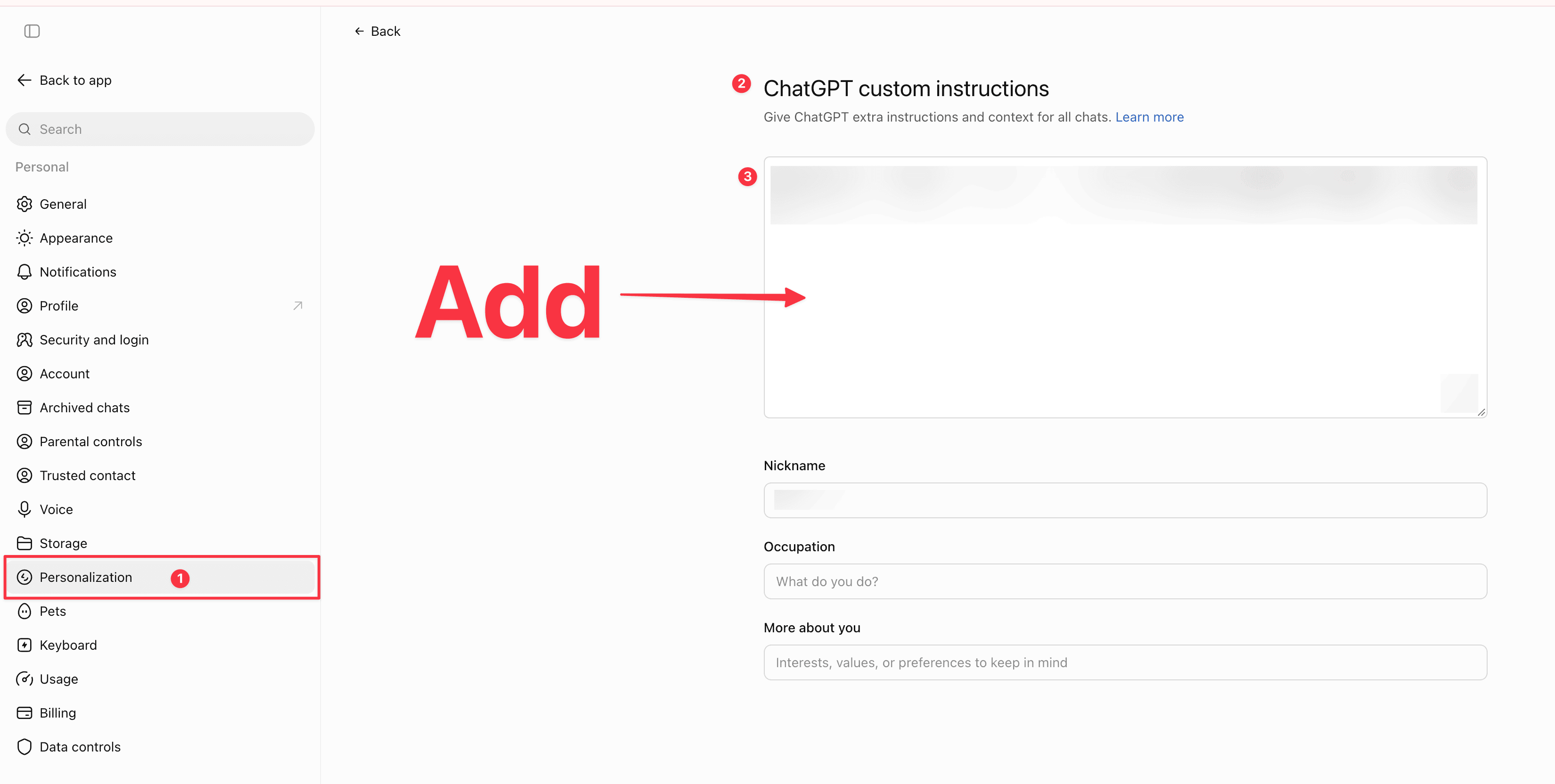
For proposals only, use a Project. Its instructions apply inside that project and override your global ones.
Claude or Gemini: use Instructions for Claude, or Instructions for Gemini.
Menus change. These were right in October 2026, but it will be in there somewhere, and if you can' t find it, then probably this 'AI life' ain't for you.
7. Let Your Clients Judge, Not the AI
Do this: Use your pick. Send it. Then log the result: opens, replies, a booking, a yes or no.
For Monday's proposal, that means sending the opening you picked.
No answer after a week is a result too. Write it down.
Then run the prompt again with what happened filled in.
And stop asking ChatGPT to grade your pick.
It will say it's great, because agreeing with you is the easiest thing it can do.
Ask it to argue against you instead, and tell it to name the weakest part of your pick.
Do not ask the model to judge itself.
ChatGPT can tell you what most people pick. Your clients tell you what they pick. Which is more important to you?
Sometimes a client goes against the grain. It happens; everyone is different. Step 5 of the prompt then suggests a rule from what won.
It's marked "suggested," so you can keep it or drop it. That part's your decision.
Keep it only if it sounds like something you'd say out loud, and cut it the second it doesn't.
Check the log after each result.
Every rule should have a result next to it, or "not yet."
The rules with good results are the ones worth keeping.
If Nothing You Write Reaches a Client
Then skip this one. Every fix here needs a real reader on the other end.
Skip it too if ChatGPT only answers quick questions for you.
Stay if you write for clients most weeks.
Make ChatGPT Less Generic Before Monday's Proposal
Do it once this week, on one real proposal.
Tell ChatGPT who it's for. Paste one piece of yours that worked.
Ask for openings from obvious to rare, and make it name the safe one.
Pick yours. Write your one line on why.
Then give that choice to the free Taste Log prompt.
Save what it gives you in your custom instructions.
Frequently Asked Questions
Can Custom Instructions Make ChatGPT Less Generic?
Yes, if what you put in them is about your clients.
"Be specific" gives ChatGPT nothing new. Put in your Taste Log rules from fix 6.
Then see whether the next draft follows them.
How Do I Stop ChatGPT Sounding Like AI?
Fix the wording and the pick.
For the wording, cut the tells and add real details.
How to make LinkedIn posts sound human shows how.
For the pick, use fixes 3 to 7 above.